
Geneva Moon1.2.1 - App Store
You'll be able to see results in few seconds.
Publisher Description
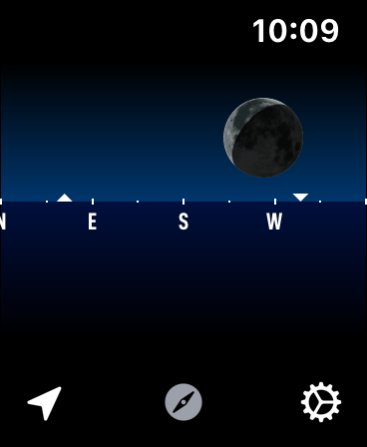
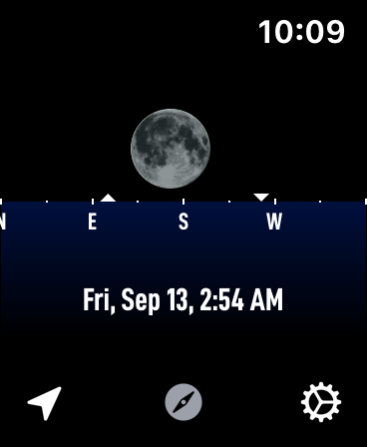

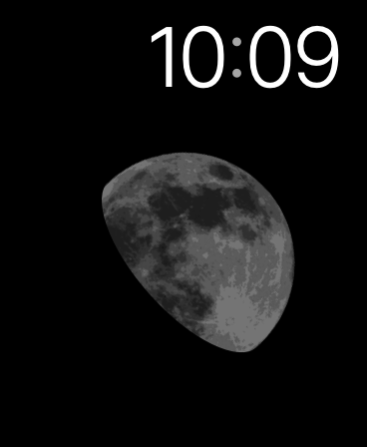
I've always liked wearing a lunar complication on my Apple Watch. There is something both visually delightful but yet also slightly geeky about it. But I was unable to find a complication that provided an astronomically accurate moon display...which just kinda bothered me. So I made Geneva Moon.
Geneva Moon seeks to provide a highly accurate, visually pleasing indication of what the moon looks like right now, right where you are. My goal was to make it so that if you look down at your wrist and then up into the sky the images you see should match.
It includes a robust set of complications for every watch face type.
Choose between either a visually rich 'actual ' appearance or a more simplified version, to fit your own personal style.
The main display indicates the current azimuth and elevation of the moon along the horizon along with a visual indication of its phase and orientation.
Rotate the Digital Crown to shift forward and backwards through time and see how the moon will shift (tap on the screen to reset to now)
On Apple Watches equipped with a compass (Series 5) you can have Geneva Moon orient itself towards the actual moon to make it easier to locate the moon in the sky.
Thank you for considering Geneva Moon, I hope you enjoy having the moon on your wrist as much I do.
-Dave
Version History Fix for California face missing the "Actual" moon style. 1.2.1 Sep 25 Compatibility with latest devices and operating systems. 1.2 Sep 23 - Fix an issue where the previous moon phase button wouldn't respond correctly
- Fix an alignment issue that caused the horizon view to off by one pixel 1.1.1 10/10/2019 This update includes:
- A new Info area that gives details about moon illumination and age, as well as, the moon rise and set times for the displayed day
- An option to jump forward and backwards to the next major phase point (New, 1st Quarter, Full, 3rd Quarter)
- Improved rendering for the 'Actual' appearance for tinted complication types (Utility, Simple, Modular, Xtra Large)
- Fix an issue where the location/settings screens wouldn't dismiss properly
- Provide details of location update process to clarify when issues with GPS are detected
This app was renamed with this update from Moon++ to Geneva Moon. It turns out that typing the "+" symbol on the Apple Watch is really tricky so I changed it to something much easier to dictate/write. 1.1 10/09/2019 Quick bug fix update to address
- an issue where the complication coloring on the California face wasn't correct
- an issue where the illuminated moon side could be incorrect. 1.0.1 09/26/2019 1.0 09/26/2019
About Geneva Moon
The company that develops Geneva Moon is Cross Forward Consulting, LLC. The latest version released by its developer is 1.2.1.
To install Geneva Moon on your iOS device, just click the green Continue To App button above to start the installation process. The app is listed on our website since 2026-10-16 and was downloaded 0 times. We have already checked if the download link is safe, however for your own protection we recommend that you scan the downloaded app with your antivirus. Your antivirus may detect the Geneva Moon as malware if the download link is broken.
How to install Geneva Moon on your iOS device:
- Click on the Continue To App button on our website. This will redirect you to the App Store.
- Once the Geneva Moon is shown in the iTunes listing of your iOS device, you can start its download and installation. Tap on the GET button to the right of the app to start downloading it.
- If you are not logged-in the iOS appstore app, you'll be prompted for your your Apple ID and/or password.
- After Geneva Moon is downloaded, you'll see an INSTALL button to the right. Tap on it to start the actual installation of the iOS app.
- Once installation is finished you can tap on the OPEN button to start it. Its icon will also be added to your device home screen.
Program Details
System requirements
Download information
Pricing
Version History
version 1.2.1
posted on 2026-10-16
Version History Fix for California face missing the "Actual" moon style. 1.2.1 Sep 25 Compatibility with latest devices and operating systems. 1.2 Sep 23 - Fix an issue where the previous moon phase button wouldn't respond correctly
- Fix an alignment issue that caused the horizon view to off by one pixel 1.1.1 10/10/2019 This update includes:
- A new Info area that gives details about moon illumination and age, as well as, the moon rise and set times for the displayed day
- An option to jump forward and backwards to the next major phase point (New, 1st Quarter, Full, 3rd Quarter)
- Improved rendering for the 'Actual' appearance for tinted complication types (Utility, Simple, Modular, Xtra Large)
- Fix an issue where the location/settings screens wouldn't dismiss properly
- Provide details of location update process to clarify when issues with GPS are detected
This app was renamed with this update from Moon++ to Geneva Moon. It turns out that typing the "+" symbol on the Apple Watch is really tricky so I changed it to something much easier to dictate/write. 1.1 10/09/2019 Quick bug fix update to address
- an issue where the complication coloring on the California face wasn't correct
- an issue where the illuminated moon side could be incorrect. 1.0.1 09/26/2019 1.0 09/26/2019
version 1.1.1
posted on 2019-10-10
Oct 10, 2019 Version 1.1.1
- Fix an issue where the previous moon phase button wouldn't respond correctly
- Fix an alignment issue that caused the horizon view to off by one pixel
Disclaimer
Official App Store Link
We do not host Geneva Moon on our servers. We did not scan it for viruses, adware, spyware or other type of malware. This app is hosted by Apple and passed their terms and conditions to be listed there. We recommend caution when installing it.
The App Store link for Geneva Moon is provided to you by apps112.com without any warranties, representations or guarantees of any kind, so access it at your own risk.
If you have questions regarding this particular app contact the publisher directly. For questions about the functionalities of apps112.com contact us.
